
Metaverse Ink

September 16, 2009

Standalone but Join the Party

Filed under: Hypergrid, OpenSim — Diva Canto @ 7:28 am

It’s no secret that I love OpenSim standalone installations more than “grids”. For most things I envision doing with virtual worlds, including installations in my university, I can’t see the value of having a huge virtual space that is both shared between several tenants and centrally managed. The things I like to do fit perfectly in a few regions managed and controlled by me. The UCI Grid is about to become a web of hypergrided standalones. I suspect that many people are on the same boat. It used to be the case that standalones were solitary worlds that didn’t connect to anything or anyone; with the Hypergrid, that has changed. Standalones now can connect to the rest of the Metaverse — OSGrid, ReactionGrid, your friend’s standalones, etc. It’s a big world out there, and you can access it from your own small world.

I’m happy to announce Metaverse Ink’s “Diva Distribution”– a lean and mean OpenSim distribution targeting hypergrided standalones that comes preconfigured and that is very easy to keep up to date with newer releases of OpenSim. The Diva distribution is, literally, my personal preferences using the many configuration options of OpenSim. Here is what it consists of:

  • MySQL as the DB backend. I used SQLite for a long time. SQLite is really easy to use, it requires no installation, it’s great for beginners. However, it’s clear that SQLite doesn’t scale well for long-term worlds. Moreover, using a MySQL server on the backend enables very interesting hybrid architectures that I will be talking about soon. The diva distribution requires some expertise for setting up MySQL, but it’s worth it. The instructions that come on the distribution make the MySQL setup for OpenSim really easy.
  • ODE Physics. Easy choice here. Even the official OpenSim distribution is about to change to ODE as the default physics engine.
  •  XEngine as the scripting engine, and lsl as the scripting language. XEngine is the most stable of the scripting engines we currently have, and lsl is the most widely used scripting language. All other language support is still experimental and fairly insecure.
  • One Megaregion of 512×512 meters. That’s right! Megaregions just made it into OpenSim, thanks to Teravus, and they are working great. With megaregions there are no border crossings, everything is very smooth.
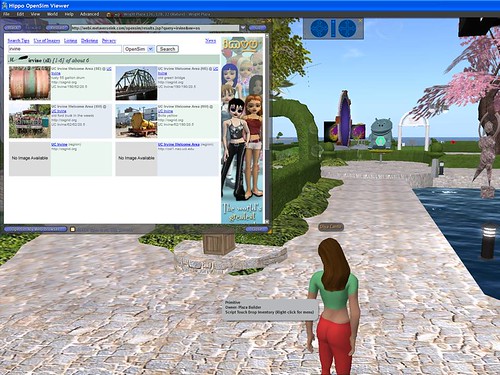
  • MetaverseInk Search. If you want to make your world searcheable, mark your parcels “Show in search”, and they will be listed on MISearch’s engine. Others can teleport to your world from search results. Everyone can do this on their OpenSim by setting a certain configuration variable; the diva distribution has that preconfigured.

Over time we plan to add more goodies to the diva distribution, so stay tuned.

Additionally, the diva distribution contains two tools that make it really easy to configure and update your installation. They are:

  • Configure: this is the tool you should run after unziping the first distribution. Be ready to tell it (a) the name you want to call your world; (b) the password for the MySql DB opensim account; (3) your externally visible IP address or domain name. Once you answer these questions, Configure will do all necessary configurations for you. You don’t need to edit any .ini files.
  • Update: once you get the first installation set up, updating it is as easy as running the Update tool. Update asks no questions from you, it just does the right thing.

While the diva distribution comes preconfigured with my own preferences, it is possible to change these preferences to yours. For example, if you want more than a 512×512 megaregion, you can add more regions. The instructions for how to do that come in the documentation that is included in the distribution.

So where can you get it? Get it at http://github.com/diva/d2/downloads — the file to download is called diva-rNNNN.zip, which is listed at the bottom of that page.
Unzip it, read README, and follow the instructions from there.

Let me finish this post by reminding everyone that the current version of the Hypergrid, which we call HG1, is fairly insecure. Don’t take your favorite avatar to places that you don’t trust. HG2 is coming, but it’s not here yet.

23 Comments

  1. This is very cool Diva thanks so much for launching such a great idea! We would love to Hypergrid portal to UCI from ReactionGrid…..

    Comment by Kyle G — September 16, 2009 @ 9:36 am

  2. Now this sounds nice and easy :).. I will be trying it.. but the download link says “Sorry, we’re down for maintenance”..

    /me bookmarks the site to come back when its fixed :)

    Comment by Skidz Tweak — September 16, 2009 @ 10:30 am

  3. Github was under a DDoS attack this morning. Bad timing! It’s up now.

    Comment by Diva Canto — September 16, 2009 @ 12:18 pm

  4. Excellent news love the idea of an Update Tool, together with all the other goodies. The 512×512 Megaregion in my mind translates in to a good size equivalent website. Hypergrid enabled we can of cause go from one to another just like any other website (grid, standalone). It is great waking up to news like this thank you so much.

    Comment by Per Pegler — September 16, 2009 @ 1:04 pm

  5. […] now have a choice between loading Divas Distro with 512×512 region, Hypergrid and an update module in opensim, Blue Mars or go to bed […]

    Pingback by Troppo The Blog » Design and Marketing in SL and RL » Blog Archive » A look at Blue Mars — September 17, 2009 @ 2:38 am

  6. Fantastic news, many thanks for making this distribution available! One question: will the update tool preserve mods to opensim.ini, or should we put all our preferences in /config-include?

    Comment by Zonja Capalini — September 17, 2009 @ 7:15 am

  7. @Zonja The Update tool migrates config-include/MyWorld.ini and Regions/RegionConfig.ini automatically, and uses the new .ini’s that come in the new release, just in case there are improvements in configurations in the new release. If you make changes to any other .ini — OpenSim.ini, config-include/DivaPreferences.ini, etc — you’ll have to migrate those by hand or with a script after running Update. Or yes, you can add your preferences to MyWorld.ini instead of OpenSim.ini.

    Comment by Diva Canto — September 17, 2009 @ 7:23 am

  8. Ok, many thanks for the info. :-)

    Comment by Zonja Capalini — September 17, 2009 @ 7:32 am

  9. I got this up and running just fine, on two machines. But both times I could never get my shape to load. Even cleared my cache, and made a shape/skin/so on..

    I followed the directions exactly. The first machine was a Suse 11 running mono 2.4.2.3 and the second was a Ubuntu LAMP server 9.04 running Mono 2.4. MySQL was used for both.

    Both server were up-to-date on patches except the Ubuntu server mono.. Which I run at a lower version on purpose.

    Master Avatar gets this error:
    [APPEARANCE]: Appearance not found in SkidzGridz 3, returning default

    And for a user that I created a shape for I get this error:
    [APPEARANCE]: Can’t find inventory item 77c41e39-38f9-f75a-0000-5859892f1111, setting to default

    Sorry for posting this here… I tried to submit this under issues.. didn’t think this was the right spot for it, but the site just blanked out on me every time I tried.

    Any ideas?

    Comment by Skidz Tweak — September 17, 2009 @ 9:46 pm

  10. I did find something in the opensim email group from a long time ago. Someone was having a similar problem. It never got answered.. but a question was posed to the person: Did you restore it using ‘advanced restore’ and re-upload all the embedded assets? It seems the skin texture item wasn’t uploaded?

    Comment by Skidz Tweak — September 17, 2009 @ 10:07 pm

  11. @Skidz I found a mantis about this:
    http://opensimulator.org/mantis/view.php?id=3835

    Note Fish_Kungfu’s entry. It actually works! but clearly this is a bug in opensim somewhere, or corruption in some data file.

    Comment by Diva Canto — September 18, 2009 @ 8:44 am

  12. Yea.. I just got it working…
    I tried skin, shape, and shirt before that.. with no luck..
    But hair works.. :) put that on and all is well…

    Thanks again.. loving the setup… running great :D

    Comment by Skidz Tweak — September 18, 2009 @ 9:14 am

  13. OK.. :) Me again..

    How do you get the hypergrid working? I have set up the router correctly.. I think.. forwarding 9000 traffic..
    I have tried with 3 different clients Hipppo/LL/Greenlife.
    I tried from Second Life/Reaction Grid/and another Diva Standalone.

    In the Diva standalone I think I got the closest. But I get a message.. “Region is too far (5031, 216)”. All other grids just failed.
    Here is my grid url: secondlife://Gridaverse.com:9000/

    Comment by Skidz Tweak — September 18, 2009 @ 10:54 am

  14. I did get it to work from two Diva grids.. Don’t know what I changed.. But I did start forwarding 9001 9002 & 9003 for the other three sims as well…

    Comment by Skidz Tweak — September 18, 2009 @ 11:51 am

  15. Good! We’ll add instructions for how to open ports on firewalls, etc., although that has so much variation that it’s going to be impossible to cover all situations.

    The “Region is too far” message is a good indicator that HG is working. It just that the current viewers have a limitation on teleports that can’t handle more than 4096 cells in either direction from where you are. The UCI Grid has two gateways to help with this; they are:

    secondlife://ucigrid04.nacs.uci.edu:9003 — in 3000, 3000
    secondlife://ucigrid04.nacs.uci.edu:9007 — in 7000, 7000

    Depending on where your standalone was placed (it’s randomly chosen between 100 and 10,000), you may need to do 2 hops to get to other places far away.

    Comment by Diva Canto — September 18, 2009 @ 1:17 pm

  16. The set up worked fine nice and easy However when I try to load an Oar I have a problem.
    The first Oar loads fine in the root Region, the oar is about 110 mb and has 6000 prims no problem at all.

    Second oar I load in to spot no2 only a small file 20mb it looks like 90 % is just fine but 10% is phantom when I try to edit the build I get an error [Prim inventory]: Inventory request for ……
    which dosen’t exist.

    When I load the 3rd oar file similar size as the first one about 6000 prims Win message says the OpenSim.32BitLaunch has stopped working well it might have but all the prims are still loading as I see it in the viewer. And now the error is Prim crossing failed.
    All prims load but about 50% are phantom? And the same error again when trying to edit the prim [Prim inventory]: Inventory request for ……which dosen’t exist.

    Is not a big problem but would be nice if the oar did work maybe this is an oar megaregion prob?
    but more likely my stuff up :-)

    Thanks for all your good work.

    System win 7 64 bit 8 gig of ram on the server
    local network, the other comp win XP 32 using hippo viewer

    Comment by Per Pegler — September 19, 2009 @ 12:01 am

  17. @Per that is probably an OAR-Megaregions issue. Megaregions just made it to core recently so expect bugs here and there. And there are still a few open issues on mantis about OARs themselves. Try bringing this up in the IRC or file a mantis in opensimulator.org — an OAR example that doesn’t load would be great. Yes, we need to fix OARs loading for megaregions if it doesn’t work correctly.

    Comment by Diva Canto — September 19, 2009 @ 6:21 am

  18. Thank you for the answer Yes I will file a mantis.
    I have one more go at it first to see that I done everything right.
    Have a nice weekend

    Comment by Per Pegler — September 19, 2009 @ 11:48 am

  19. […] Metaverse Ink » Standalone but Join the Party […]

    Pingback by links for 2009-09-19 | Metaverse3d.com — September 19, 2009 @ 4:58 pm

  20. Diva, this effort is a huge triumph. The update process has been tough and full of pitfalls for us newbies but your distribution has made the process work seamlessly. I upgraded a single standalone from version 0.6.5 to this version and suddenly I’m flying across a megaregion! Something I wouldn’t have had the time to figure out in a while. My OAR loaded perfectly in the root region and my database with over 30 accounts (I work in a school) integrated flawlessly. Just plain great work that will make OpenSim a possibility for so many more people!

    Comment by Erik N — October 16, 2009 @ 4:51 pm

  21. I’m running the latest version of this release and the gestures won’t stay active after logout for any avi. I get this error in the console:
    “2009-10-19 14:55:54,437 ERROR - OpenSim.Framework.Capabilities.Caps [CAPS]: Problem setting asset/inventory type while converting inventory item clap to LLSD:
    System.IndexOutOfRangeException: Index was outside the bounds of the array.”
    Other inventory changes are saved no problem but gestures have to be re-activated every time. Any ideas where I might look?
    Thanks!

    Comment by Erik N — October 19, 2009 @ 10:54 am

  22. Playing with it some more I see no more error but I see on the console it gets each gesture when I click on it, but I still have to activate it to use it. I know there is a new procedure of limiting inventory retrieval. Does that mean gestures have to work this way now? Activate every time you log in?
    Sorry for so many questions…

    Comment by Erik N — October 19, 2009 @ 11:09 am

  23. Over on osgrid forums it was recommended I submit this inventory issue as a bug in the issues section here. I don’t have an account to do that, so I’m posting it here. Here seems to be a better example of the relevant console errors:
    2009-10-20 10:43:09,073 ERROR - OpenSim.Framework.Capabilities.Caps [CAPS]: Problem setting asset/inventory type while converting inventory item suprised to LLSD:
    System.IndexOutOfRangeException: Index was outside the bounds of the array.
    at OpenSim.Framework.Capabilities.Caps.ConvertInventoryItem(InventoryItemBase invItem)

    I get this error when first opening the gestures folder on logging in to the sim, then when I activate the gestures they upload no problem. I’m on XP SP3 with the latest version of this distribution.

    Comment by Erik N — October 20, 2009 @ 6:52 am

RSS feed for comments on this post.

Sorry, the comment form is closed at this time.

Powered by WordPress